

1
Open Home
- Open the OpenSubs admin; it lands on Home.
- Needs attention appears only when something needs you: subscriptions with payment trouble and operations alerts awaiting review. Review subscriptions opens the list filtered to Billing issues; Review operations opens Settings > Operational health (step 2).

- Glance at Store health (revenue, new and cancelled subscriptions over 7 days, current active count), Subscription gains this week (new, recovered, reactivated, resumed), and Recent wins (recovered revenue, subscriptions recovered, net active growth).
Checkpoint: no Needs attention banner, green trend badges on the Store health cards.
A failed payment is already being handled. A recovery campaign opened the moment the charge failed: emails, retries on your schedule, and an automatic try of any backup card. When a payment fails shows the timeline.
Home also nudges. The setup checklist and recommendation cards are adoption prompts, not problems: Hide setup tucks the checklist behind a Show setup banner. On a young store, placeholders under Recent wins mean nightly analytics are still collecting.
2
Open Operational health
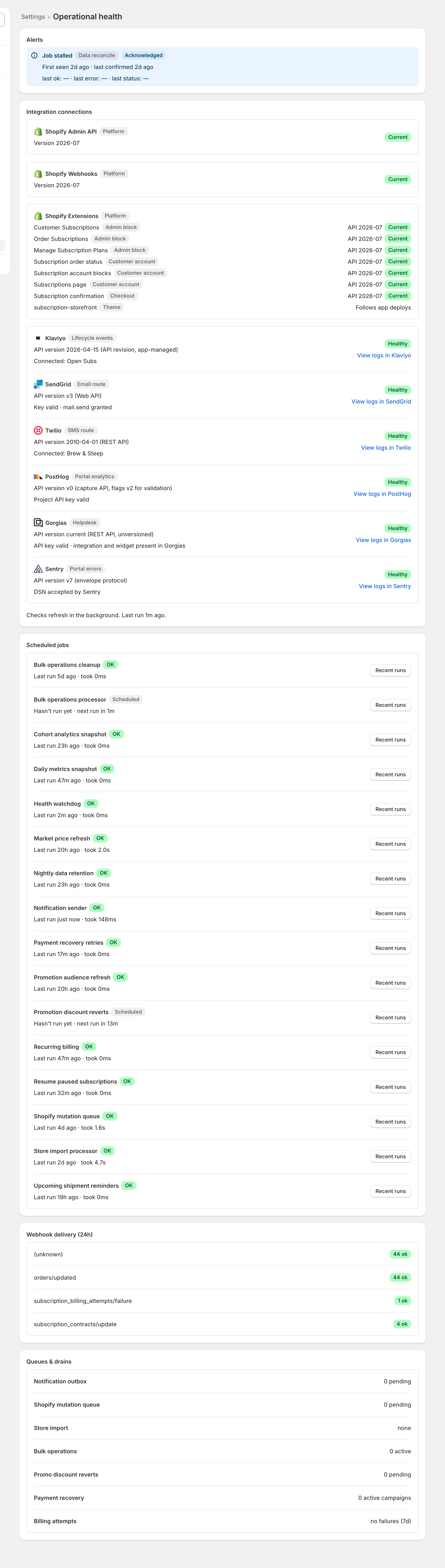
- Open Settings > Operational health: five panels, read top to bottom.
- Read any alert and click Acknowledge to mark it read; it resolves when the check behind it passes again. A quiet job raises an alert instead of keeping its OK badge.
- Most mornings the screen is quiet, and that is the expected state.
- Anything red or failing: When an alert opens names every alert and its fix.
Checkpoint: no open alerts, providers Healthy, jobs OK or Scheduled, failed and waiting counts near zero.
3
Once a week, not every day
- Open Analytics and give three tabs a minute each: Overview, Dunning, Cancellations.
- Pick a date range on any tab; Overview also takes a Compare to period.
- Dunning: what failed and what recovery won back.
- Cancellations: why subscribers leave and what your cancellation flow saves.
- Two quirks: trend charts lag one nightly snapshot (headline numbers are live), and money is never summed across currencies.
- Acting on the trends is territory for the Growth Program.