

1
Twilio isn't connected, or isn't the route
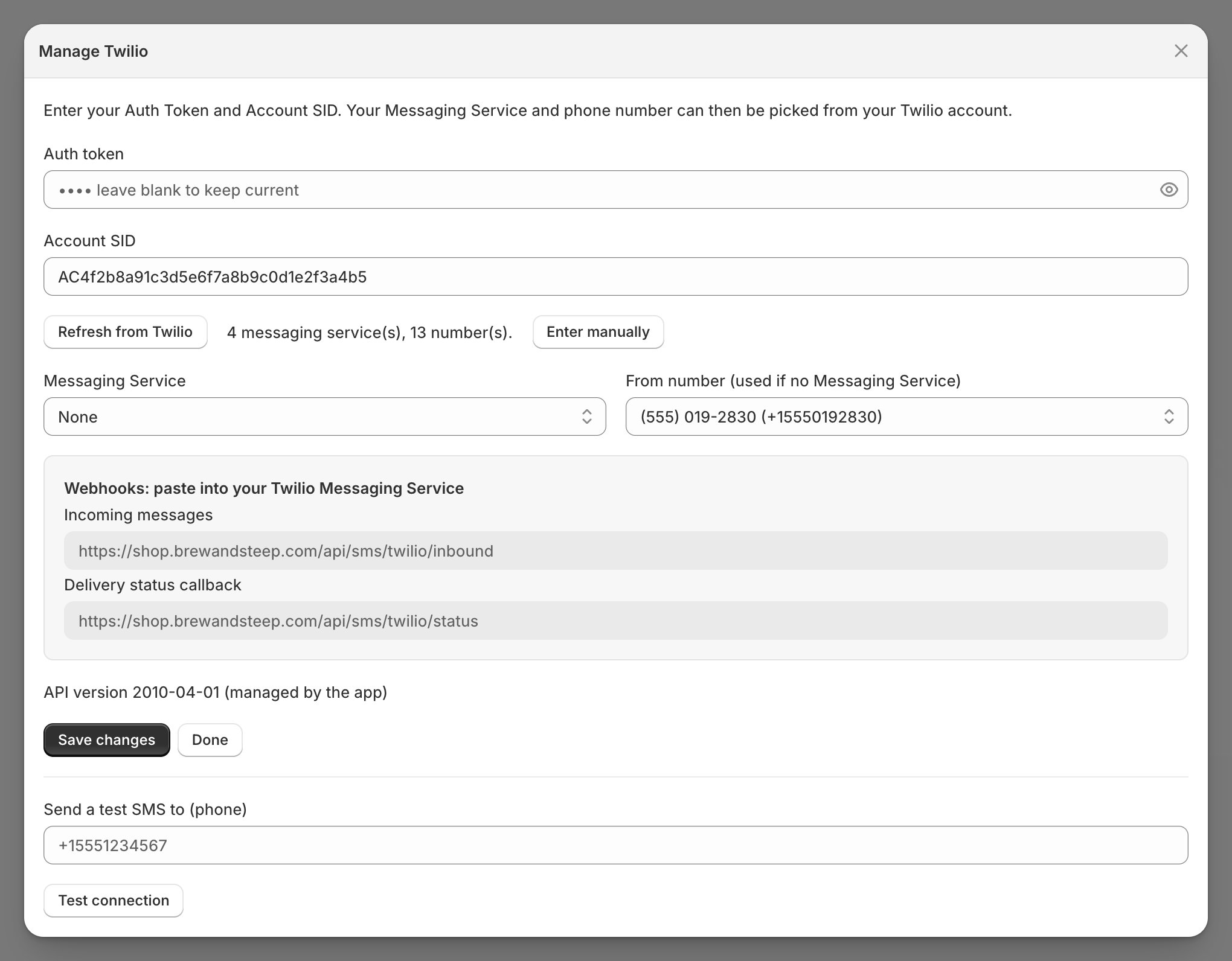
- In Settings > Integrations, connect Twilio: the Connect Twilio modal takes your Auth token, Account SID, and a Messaging Service or From number (one of the two is required).
- Under Notification routing, set SMS notifications to Twilio and Save; connected but not routed sends nothing, and the SMS settings page shows a banner.
- Prove it: enter your own number under Send a test SMS to (phone) and click Test connection.
- Full wiring: Set up email and SMS.
Checkpoint: the test lands on your phone.
Klaviyo can hold the SMS route instead. Then Klaviyo flows decide what sends, logged under the Klaviyo channel; flows import as drafts that send nothing until set live (Settings > Notifications > Email > View created flows & templates lists each one’s status). The phone only reaches Klaviyo for opted-in subscribers (login texts excepted), so check 3 still matters; the rest of this page assumes Twilio.
2
The text's event is switched off
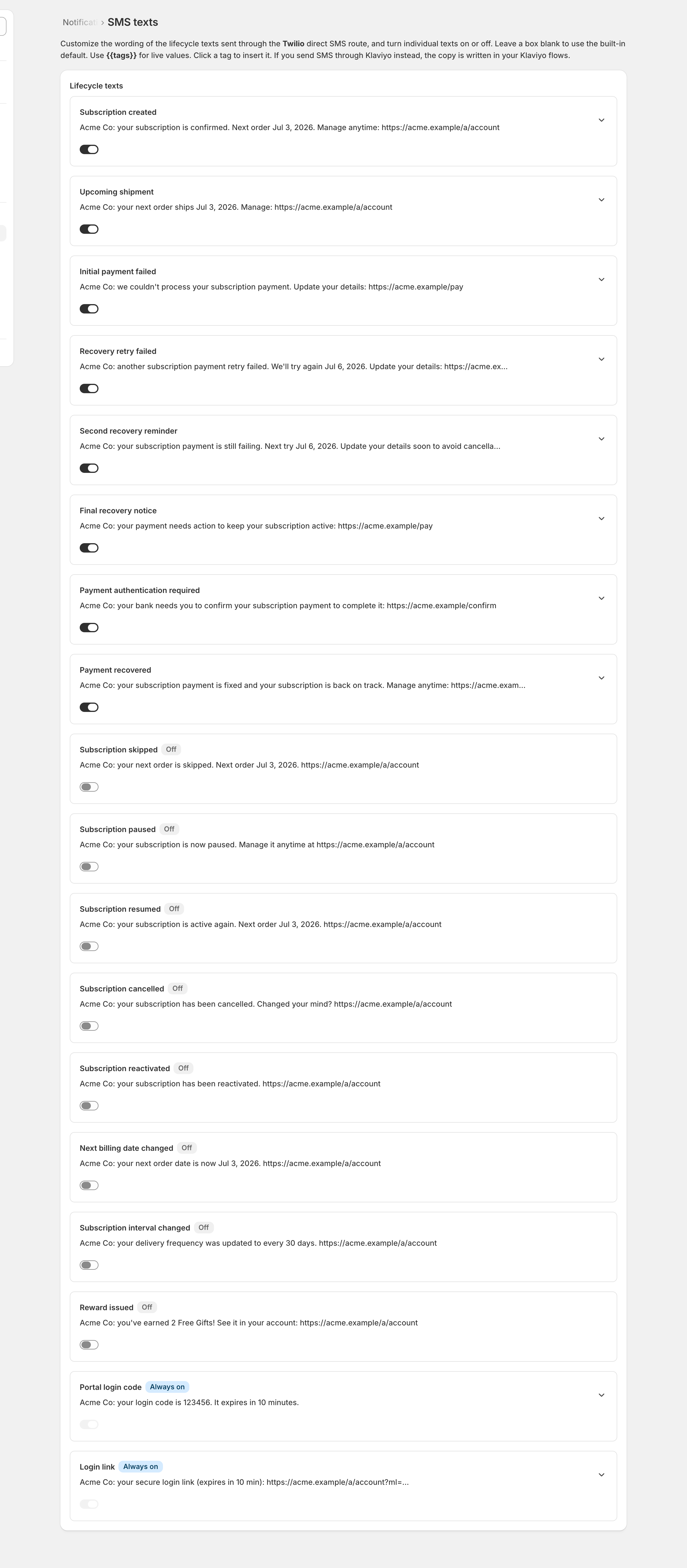
- Open Settings > Notifications > SMS texts: every lifecycle text is a row with a switch and a preview; click a row to edit its message.
- A new install starts with every lifecycle text off; only Portal login code and Login link read Always on and can’t be switched.
- Flip on the events you want, edit the copy (Insert tag for merge tags; the counter shows characters and SMS segments), and Save.
Checkpoint: the event’s switch is on.
3
The subscriber never opted in, or has no phone
- Lifecycle texts go only to subscribers who opted in by texting START to your number; STOP opts them out.
- Login codes and login links send regardless of consent, so a login text can arrive while lifecycle texts don’t.
- No phone on file means no text; the phone comes from Shopify, and subscribers can change it on their portal profile.
Consent is invisible in the admin. There’s no opt-in column, a blocked lifecycle text leaves no record, and the portal’s SMS preference checkbox doesn’t grant consent: only texting START does, so ask a silent subscriber to text START. It only counts from the phone number on their record; texting from another number stores nothing.
Checkpoint: the subscriber has a phone on file and has texted START.
4
Sent, but stuck at queued or never delivered
A text’s status in the admin follows Twilio’s receipts:
- Still Queued an hour later: check the message in Twilio’s log. Delivered there means receipts aren’t reaching your store (hand to whoever runs your code); Sent means the carrier never confirmed delivery, nothing to fix.
- On Settings > Operational health, the Integration connections panel counts Twilio’s failed deliveries over the last day and quotes the latest errors with codes; View logs in Twilio opens the full log.
- In the Twilio Console, open Monitor > Logs > Messaging and read the message’s status and error code: 21610, for example, means the recipient texted STOP.
Checkpoint: new texts move from queued to sent, and failures name their code.
5
Replies do nothing
- SKIP, PAUSE, STOP and the rest need the Incoming messages URL set on your Twilio Messaging Service (or on the phone number, if you connected with just a number). The modal lists it, with the delivery-status URL, under Webhooks: paste into your Twilio Messaging Service; paste both.
- The Messaging Service or From number in the modal must be the one whose webhooks point at your app; a mismatch drops every inbound text silently.
- Settings > Operational health shows replies that arrived but failed as failed requests under Integration connections; no failed requests and no replies means the calls never arrive (the URL is missing or wrong).
- Commands and their reply wording live under Settings > Notifications > SMS replies; what subscribers can do with them is on When a subscriber asks for help.
Checkpoint: text HELP to your Twilio number; any reply, even “don’t recognize this number”, proves the inbound wiring.
Confirm the fix the same way as email. The subscriber’s page in admin lists every send under Notifications with channel and status; When an alert opens covers the alert watching the sending pipeline.