

1
Turn the program on
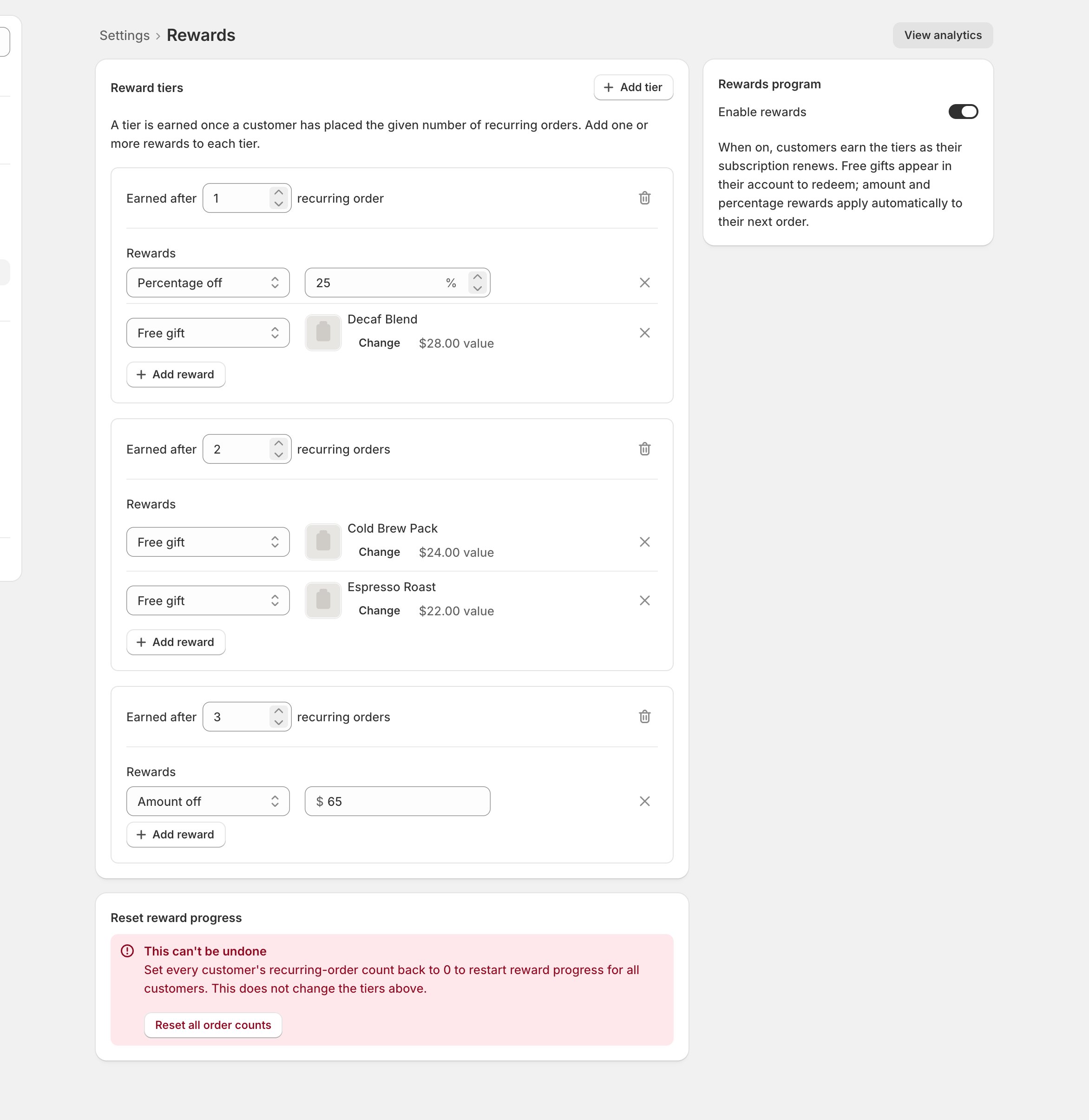
- Open Settings > Rewards and flip Enable rewards, in the Rewards program panel on the right.
- Left off, the page warns that tiers won’t be earned until the program is on.
Checkpoint: the program is on, or deliberately off while you build tiers first.
2
Build the tiers
- Click Add tier and set its earn point: Earned after N recurring orders.
- Add reward fills the tier. Three kinds:
- A tier can hold any number of free gifts but only one discount.
- Pick gifts from inside the Shopify admin; opened anywhere else, Choose gift only tells you the picker needs the Shopify admin.
Checkpoint: every gift resolves to a real product.
3
Save, then watch it work
- Save. The banner confirms: “Reward settings saved.”
- View analytics in the title bar opens Analytics > Rewards: processed versus claimed and top gifts.
- Per subscriber, earned rewards live on the subscription page’s Reward history card and available gifts in Available rewards (When a reward goes missing).
Checkpoint: the first earned reward shows up in Reward history.